Loading briefings…
← ALL BRIEFINGSFULL REPORT · SERVED INLINE
Product walkthrough · know your league, plan your moves
F1 Fantasy league tips, one screen at a time — how to use the RaceStrategist League Analyzer on the private league you actually play in
Many F1 Fantasy league tips are written for the global game. The league you play with friends or colleagues is a different game: a handful of people, the same drivers to choose from, and one table that matters. The League Analyzer compares your team with the members of one of your F1 Fantasy private leagues, race by race — lineups, 2X Boost, chips, transfers, team value, cash and points. On Standard and Pro, from the lock, it also shows what each opponent changed for this weekend. This guide opens with a five-step quick start, then walks through the comparison page number by number, its panels, the tiers and the phone layout.
Before anything else
You need an account, and Free is enough to use it. It works on classic private leagues and reads up to 10,000 members per league. Standard unlocks everything except competitor forecasts, which are Pro. Every screen below comes from a demonstration league, not a real one.
One word on etiquette. Some leagues consider outside tools a fairness issue. If yours might, check your league's own view before you lean on this.
1. Quick start: five steps from sign-in to comparison
Where to find it: the desktop sidebar and header menu say League Analyzer; the mobile bottom tab says League.
1
Sign in
Open the League Analyzer. Signed out, the page is a card under the Free and PRO strips: Sign in to use League Analyzer, the line "Sign-in is free and quick.", and a Sign in button. Press it.

2
Link your F1 Fantasy team
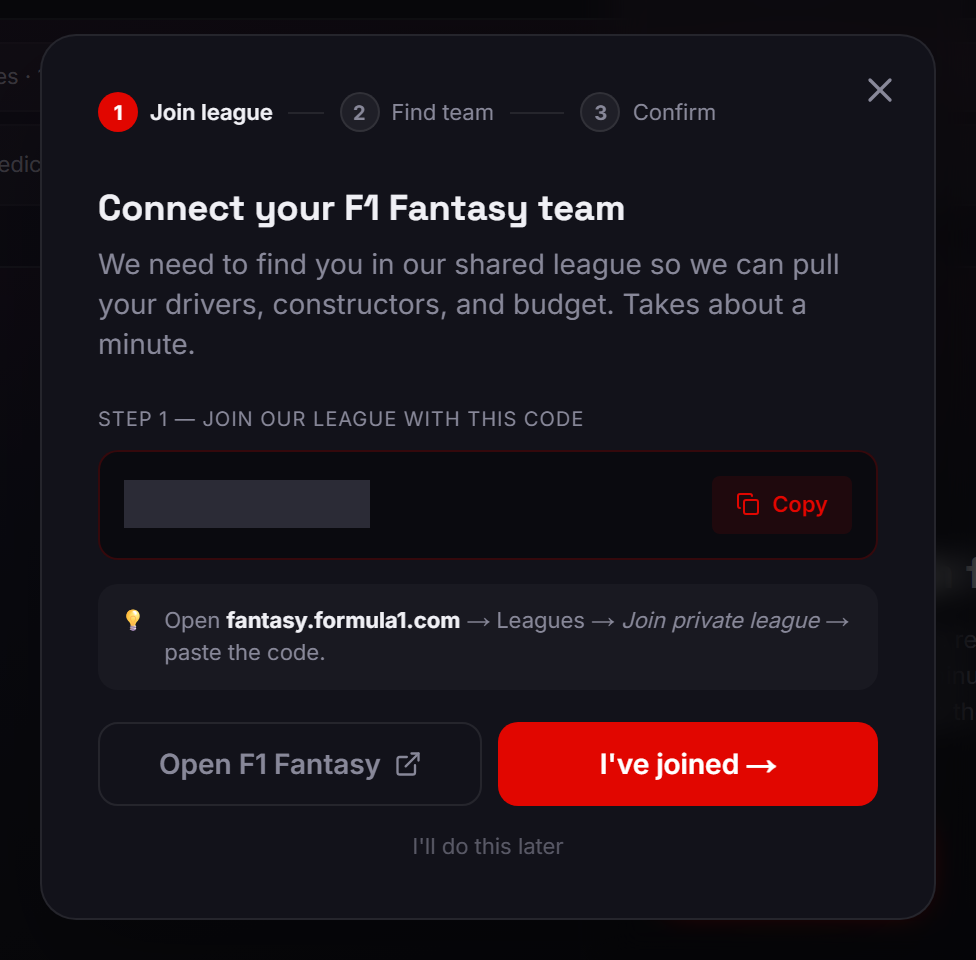
You now see Link your F1 Fantasy team first. Press Connect to F1 Fantasy. The wizard, Connect your F1 Fantasy team, opens at Step 1 — join our league with this code: Copy it, Open F1 Fantasy, join. Back here, press I've joined →, pick your team, press Continue →, then Link my account →, and you get You're all set.
If the wizard looks different
On Standard or Pro the same button opens the multi-team version, Compare all your F1 Fantasy teams: join at Step 1 — join the multi-team league, add each of your teams to that league on F1 Fantasy, then press I've added my teams →. Pick your teams, press Continue (2) →, then Add 2 teams → (the numbers are how many you picked), and you get 2 teams added.
If it opens on Link this team to your account?, it has found a team you built in our Team Builder. Press Start fresh, not Link this team →: a hand-built team does not unlock the League Analyzer, even though the wizard then says You're all set. On the next screen, I don't see my team → shows our league code; type it into F1 Fantasy to join, then press Refresh list.
Say it plainly
Linking means your F1 Fantasy team joins a Race Strategist league on F1 Fantasy. That is how we find your team. A team you build by hand in our tools does not count as linked.
3
Add a league
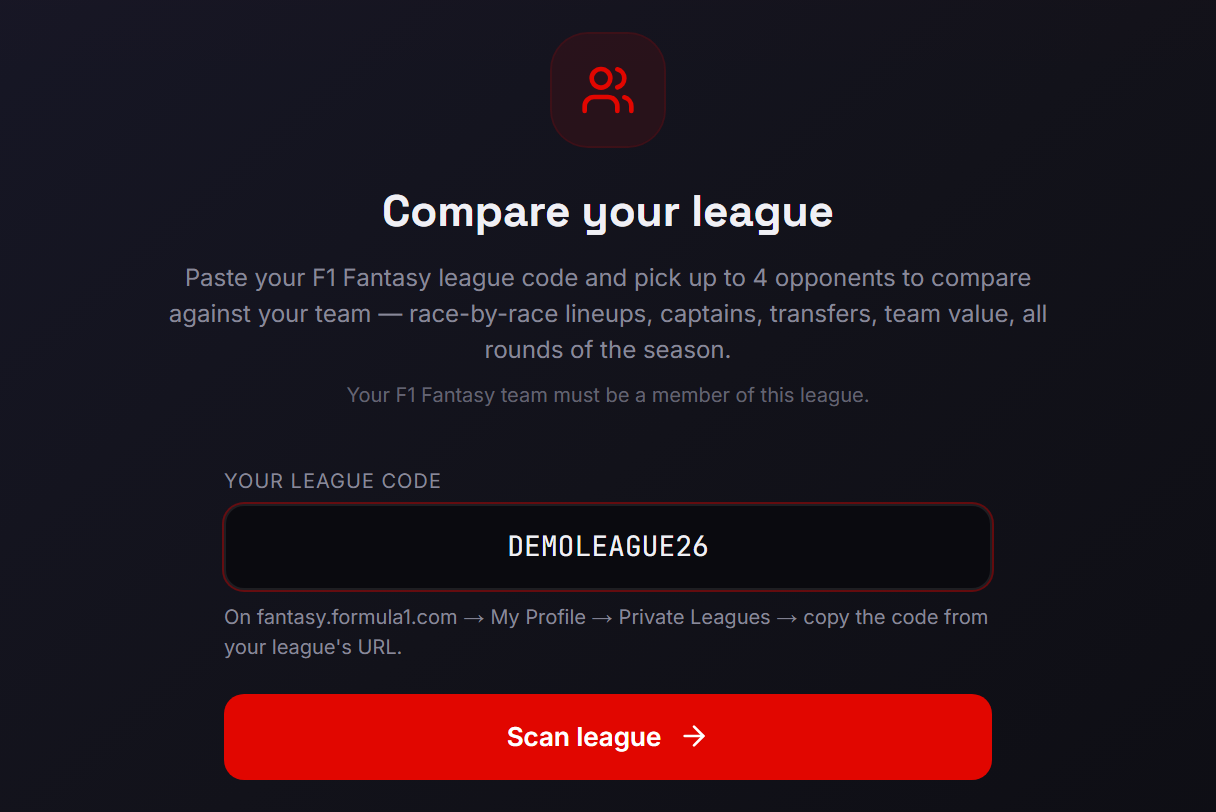
Under Compare your league, type your code into Your league code. The help text says where it lives: "On fantasy.formula1.com → My Profile → Private Leagues → copy the code from your league's URL." Your F1 Fantasy team must be a member of this league. Press Scan league; the loader says "Getting league members…". Errors show inline, for example "We couldn't find a league with that code…".
Say it plainly
When F1 hides a league's rosters, our service account briefly joins and then leaves that private league to read them.
4
My leagues
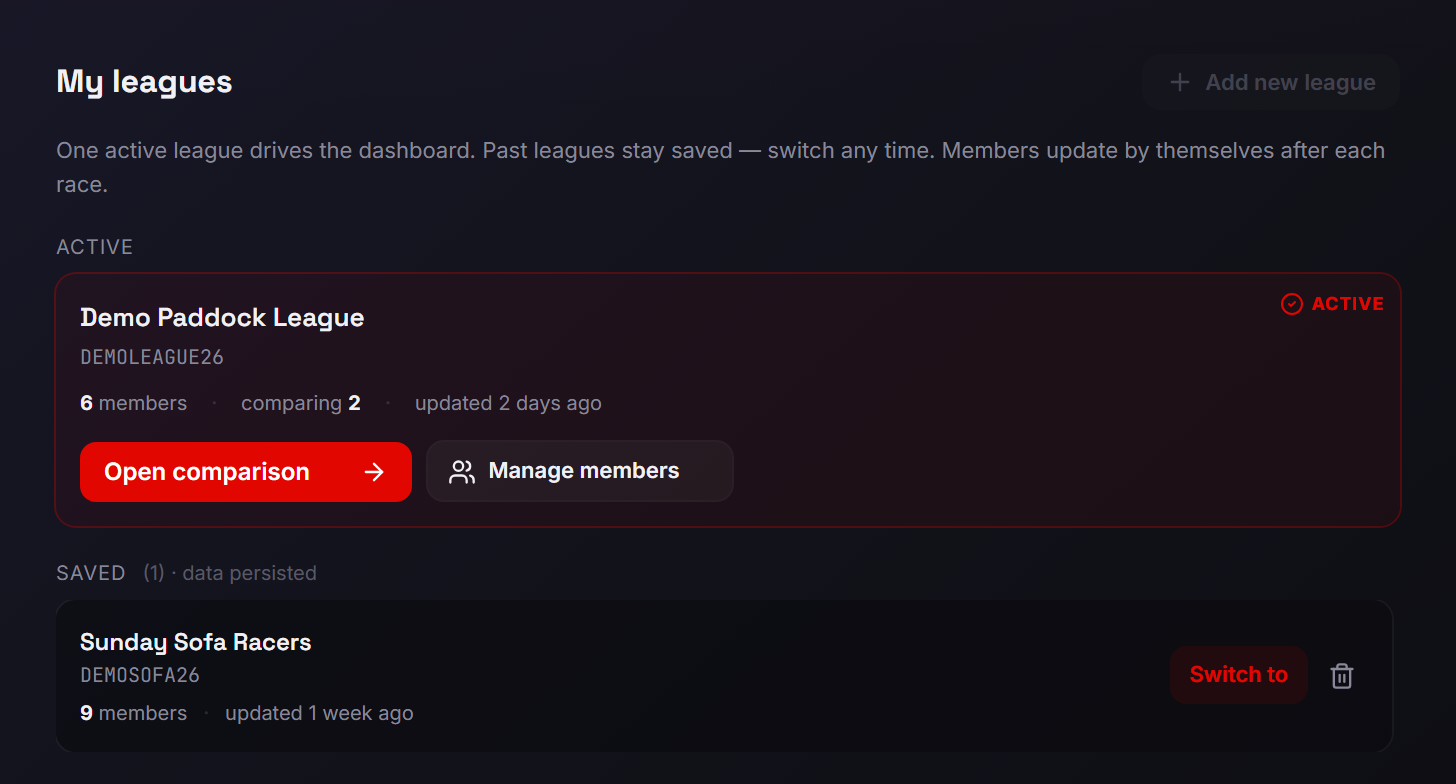
After a successful scan you land on My leagues, not the picker. Once you have picked members, the active card reads "{N} members · comparing {K} · updated {time}" — K counts you. Open comparison opens the comparison page (the first time, before you have picked anyone, it opens the picker); Manage members opens the picker. Saved leagues offer Switch to (no new scan from you; a list that is a race behind shows "Updating members…" and updates by itself) and a trash icon that forgets a league with no confirmation; the active league can't be forgotten. Add new league sits top right. The line under the heading says "Members update by themselves after each race."
5
Pick who to compare
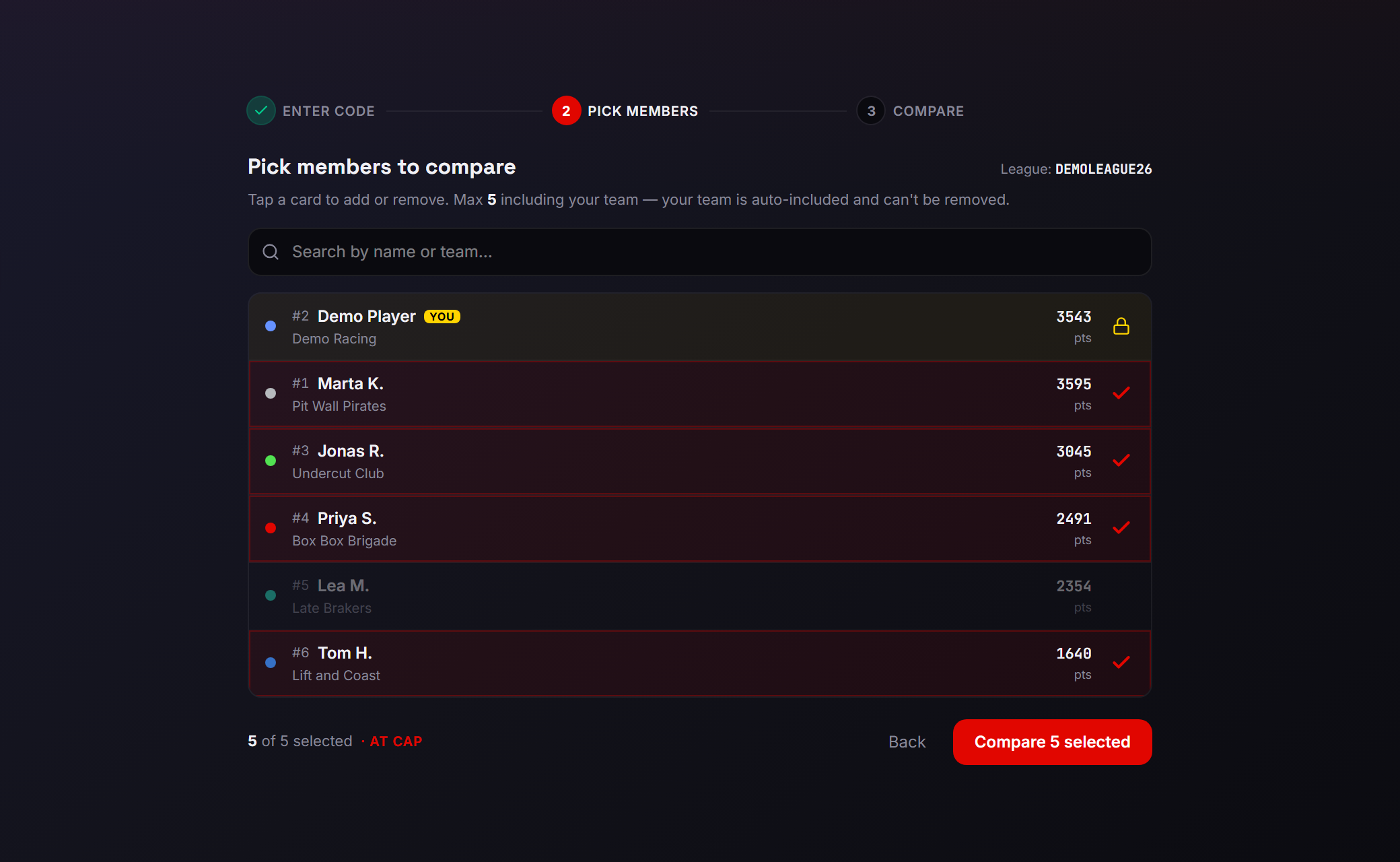
Pick members to compare: "Tap a card to add or remove. Max {N} including your team…". Your row is marked YOU and is always in; "Search by name or team..." filters a big league. The footer's "{count} of {N} selected" includes you: Free is you + 1, "2 of 2"; Standard and Pro are you + 4, "5 of 5". At the Free cap, locked rows open the Compare more opponents popover. Press Compare {count} selected.
2. Anatomy of the comparison page
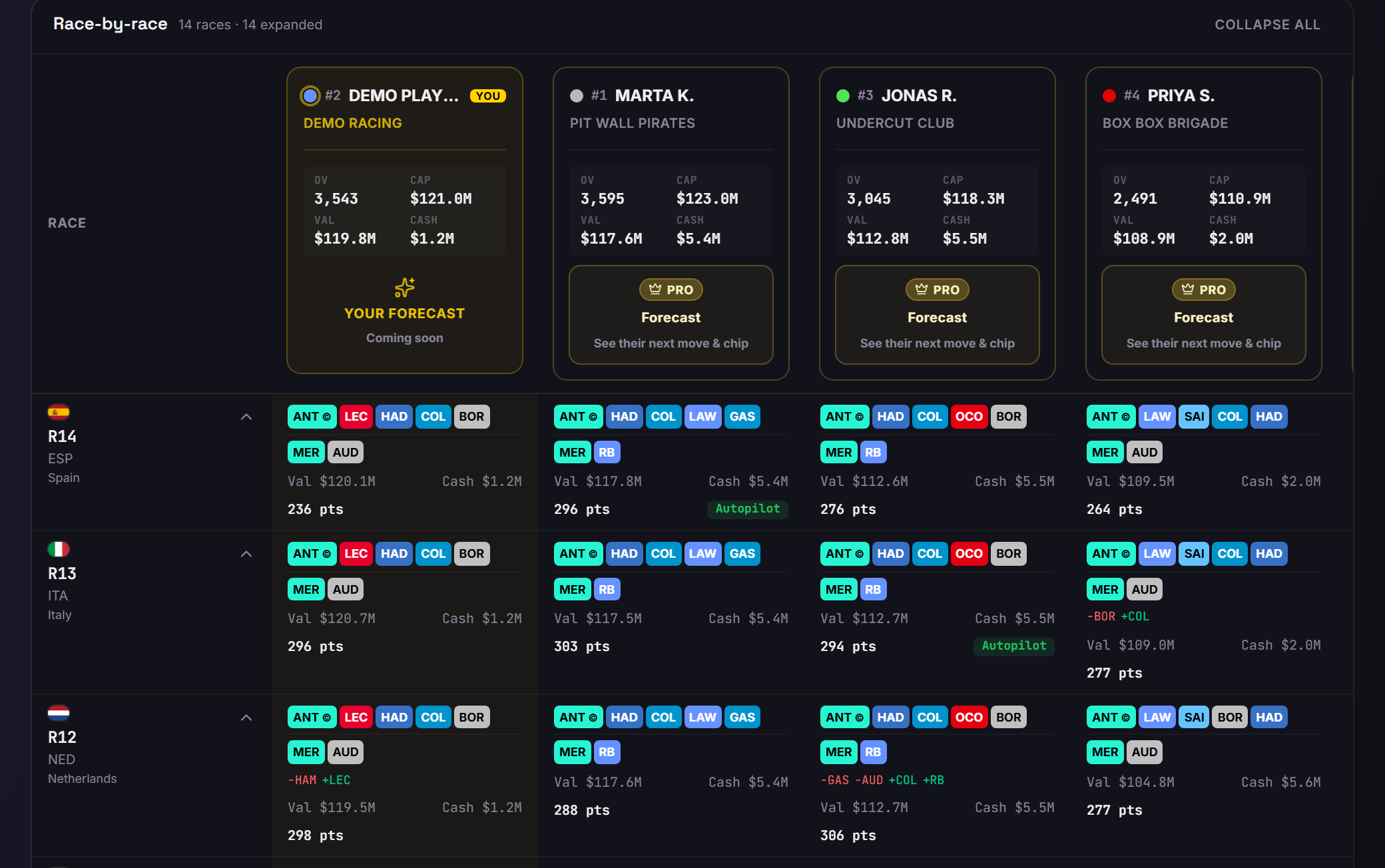
One header, one dashboard, twelve things to know. The gold numbers on the screens match the list below.
 1
2
3
1
2
3
 4
5
6
7
8
9
10
11
12
4
5
6
7
8
9
10
11
12
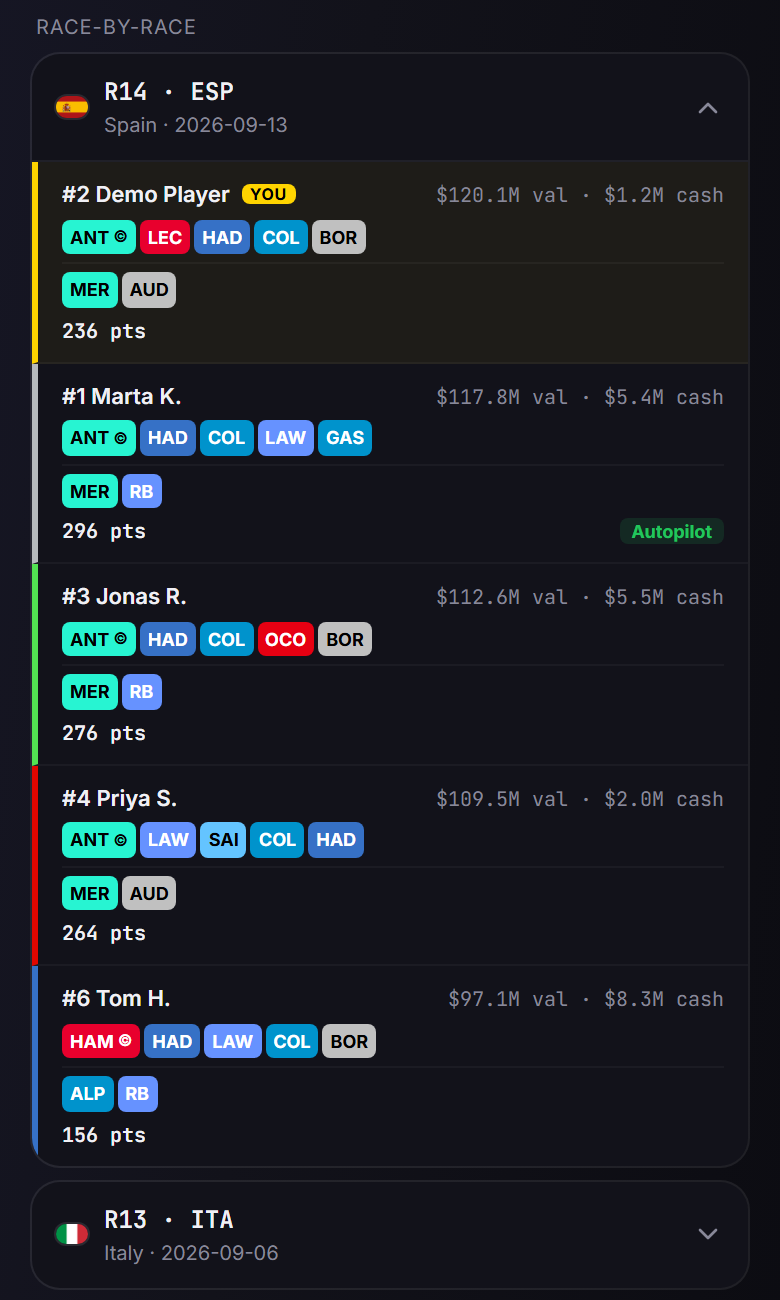
- 1Header. "← My Leagues", the league name, "{n} picked · {r} races scanned". n counts you; r counts every completed round, including those Free can't open.
- 2Manage members. Reopens the picker to swap opponents. These are the League Analyzer's own chosen members, not the Team Builder's Saved Picks.
- 3Pills. One per member under Compare, with rank number and colour dot; the colour follows the member into the grid and charts. Tap a pill to hide or show that member in the grid and the charts.
- 4Race-by-race. Completed rounds only, newest first; Expand all / Collapse all on desktop. Free opens only the 3 latest completed rounds ("3 latest · {n} locked"); older rounds open Full season history.
- 5Stat cards. OV / CAP / VAL / CASH: overall points, budget cap, team value, cash in the bank. Yours on every tier, on desktop only (the phone layout has no card for you); opponents' on Standard and Pro.
- 6Forecast card. Pro only; Free and Standard see "PRO · Forecast · See their next move & chip". Section 6.
- 7Round label. Flag, round number, three-letter race code and the race's calendar name.
- 8Chips and ©. Five driver and two constructor chips in team colours. © marks the driver holding the 2X Boost. A driver you have that an opponent doesn't is a differential.
- 9Val · Cash. "Val $X.XM" and "Cash $X.XM": that member's team value and cash for that round, as F1 recorded them at that round's prices, before that race's price changes.
- 10pts. "{pts} pts" — that member's score for the round.
- 11Diff line. What changed since that member's previous round: −OUT for picks that left, +IN for picks that came in, drivers and constructors alike. If extra transfers cost points, the deduction follows, for example "· -10 pts".
- 12Chip badge. Shown when a chip was played that round — here Autopilot. Click any cell for the drawer (section 4).
3. "This weekend — lineup moves", from the lock
Standard and Pro. Free sees it marked locked, with the popover "See opponents' lineup moves".
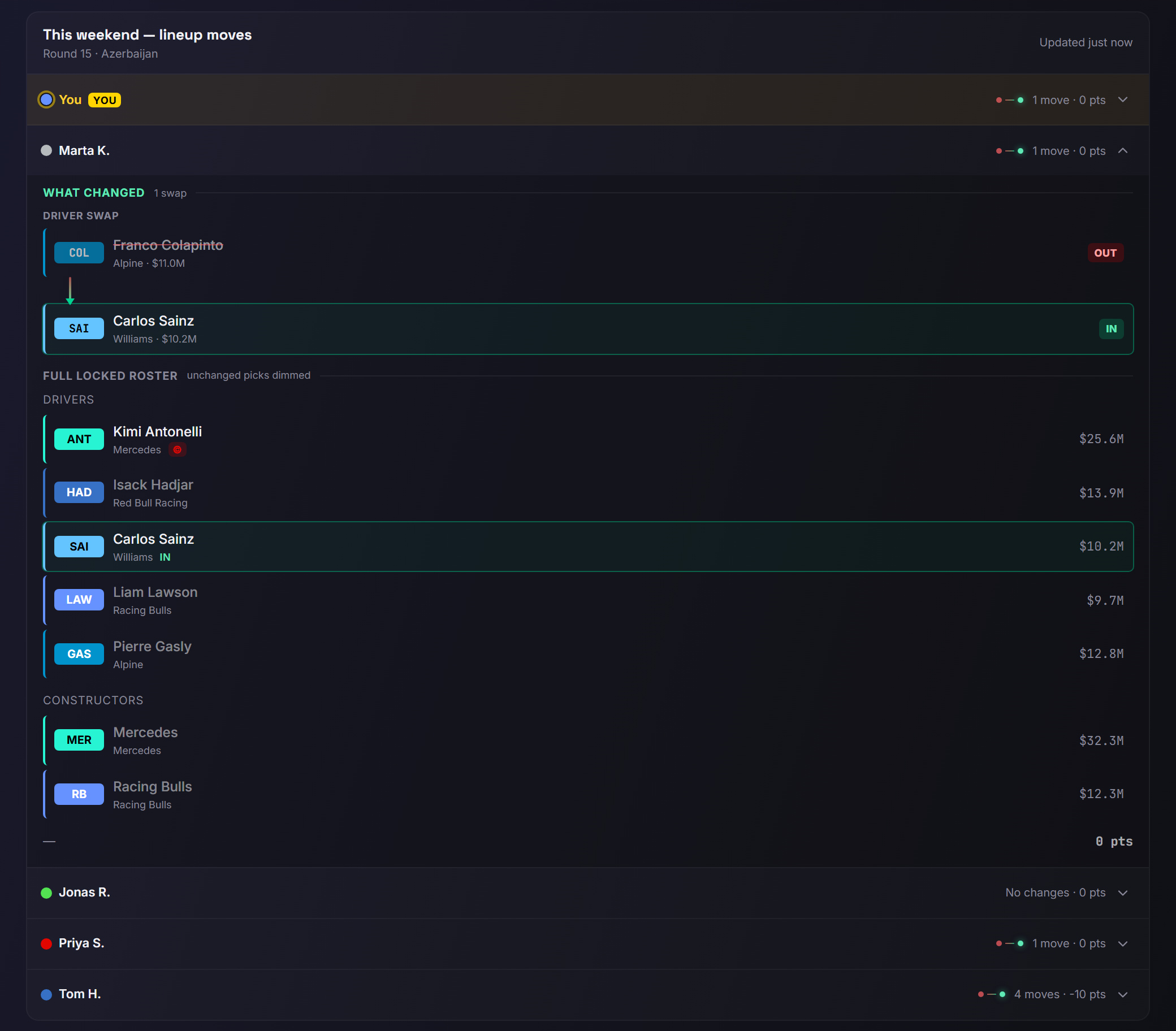
Before F1 locks lineups the panel reads "Opponent moves unlock when lineups lock — {your local time}". It never shows provisional lineups. After the lock there is one row per compared member, yours first, with a summary such as "1 move · 0 pts" or "No changes · 0 pts". Here pts is the transfer penalty that member took this round (zero or negative), not their score. Tap a row for What changed — the swaps, out and in, plus any 2X Boost change — and Full locked roster, with unchanged picks dimmed (the 2X Boost driver stays lit). There is no manual refresh button; a Retry appears only if the automatic refresh fails.
The trap
This panel shows what opponents did once lineups are locked — too late for a normal transfer this weekend; only a Final Fix chip, if you still hold it, allows one driver change before the Grand Prix. Use it to plan next week, and to see who has just played a chip. It cannot show a lineup before F1 locks it — that is what Pro forecasts model, and a model is all they are.
4. The cell drawer
Standard and Pro. Click any cell in the grid.
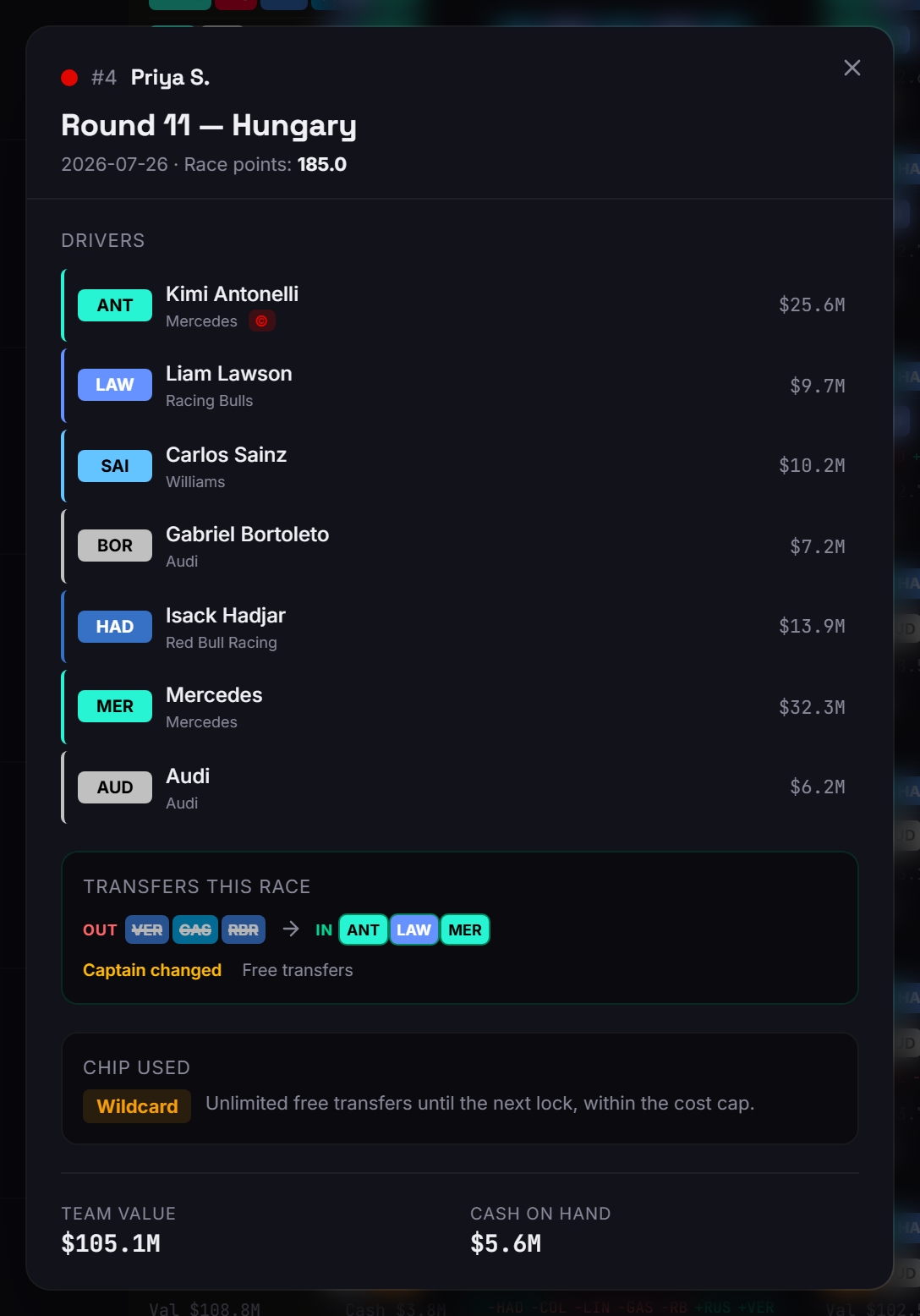
The drawer opens as Round {n} — {race} with Race points, Drivers (the list includes the two constructors), Transfers this race when there were swaps — "Free transfers", or "Cost: X pts" — Chip used when a chip was played, Team value and Cash on hand. It does not show per-driver points. On Free, clicking any cell — even your own — opens the See their roster upsell, because the drawer is Standard and up.
5. The four charts
Standard and Pro; locked on Free. All four start collapsed.
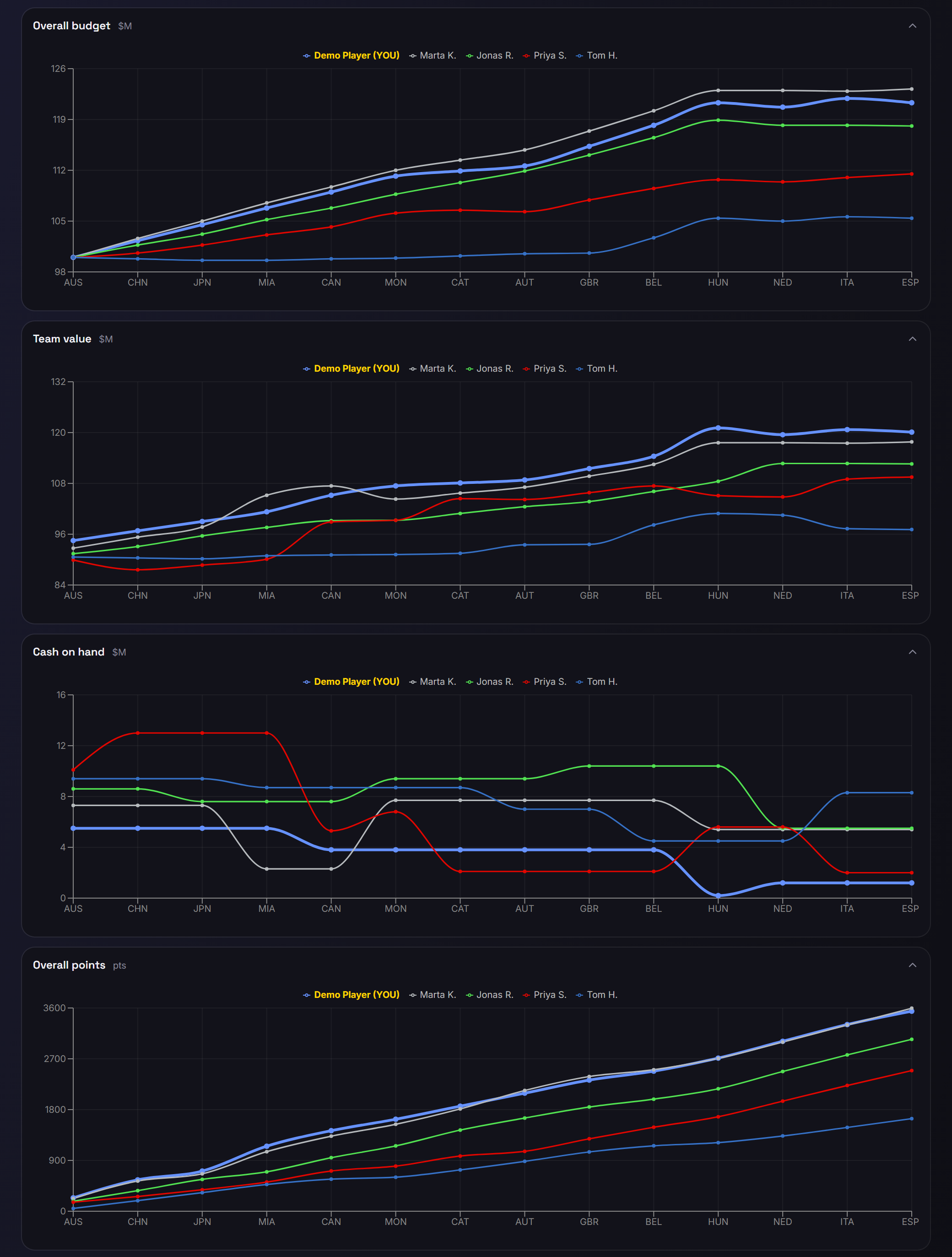
Overall budget, Team value, Cash on hand and Overall points, one line per member across the completed rounds, in the pill colours. Open the ones you want. Cash on hand is the one to make a habit of: it shows who has money to make a move and who is spent up.
6. Pro: competitor forecasts
Pro only, enforced on the server.
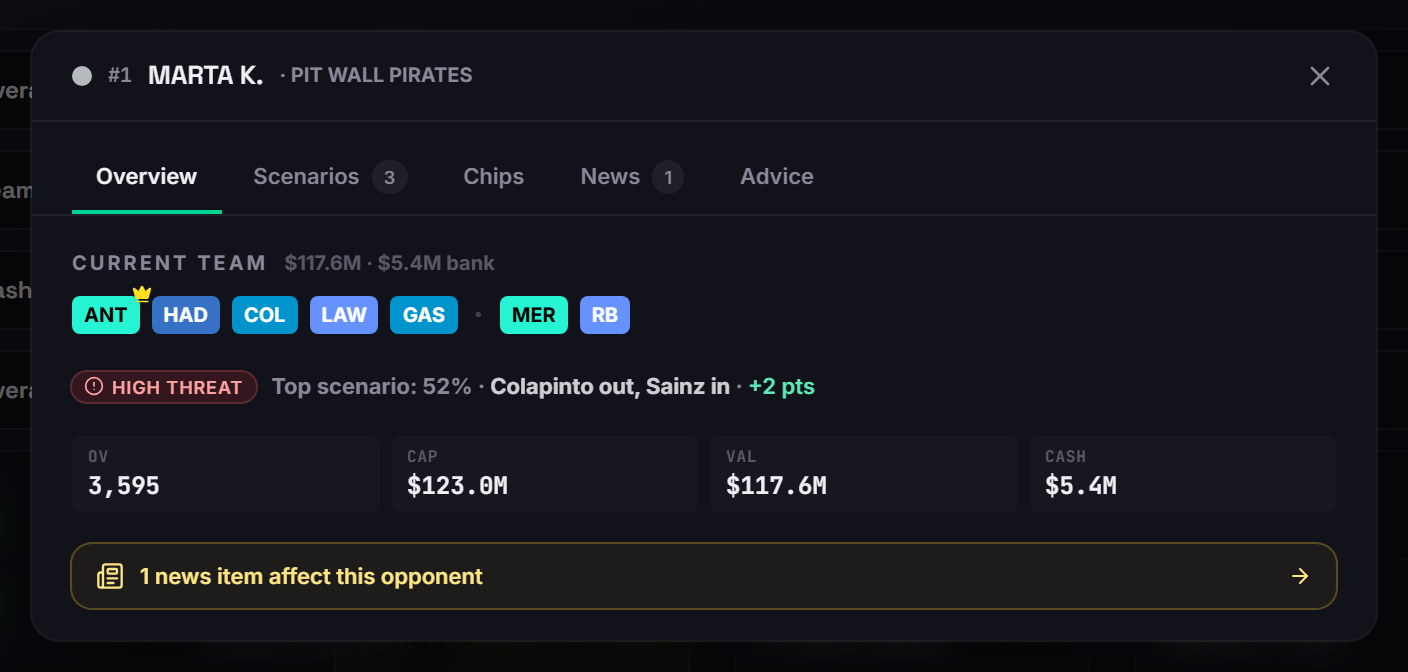
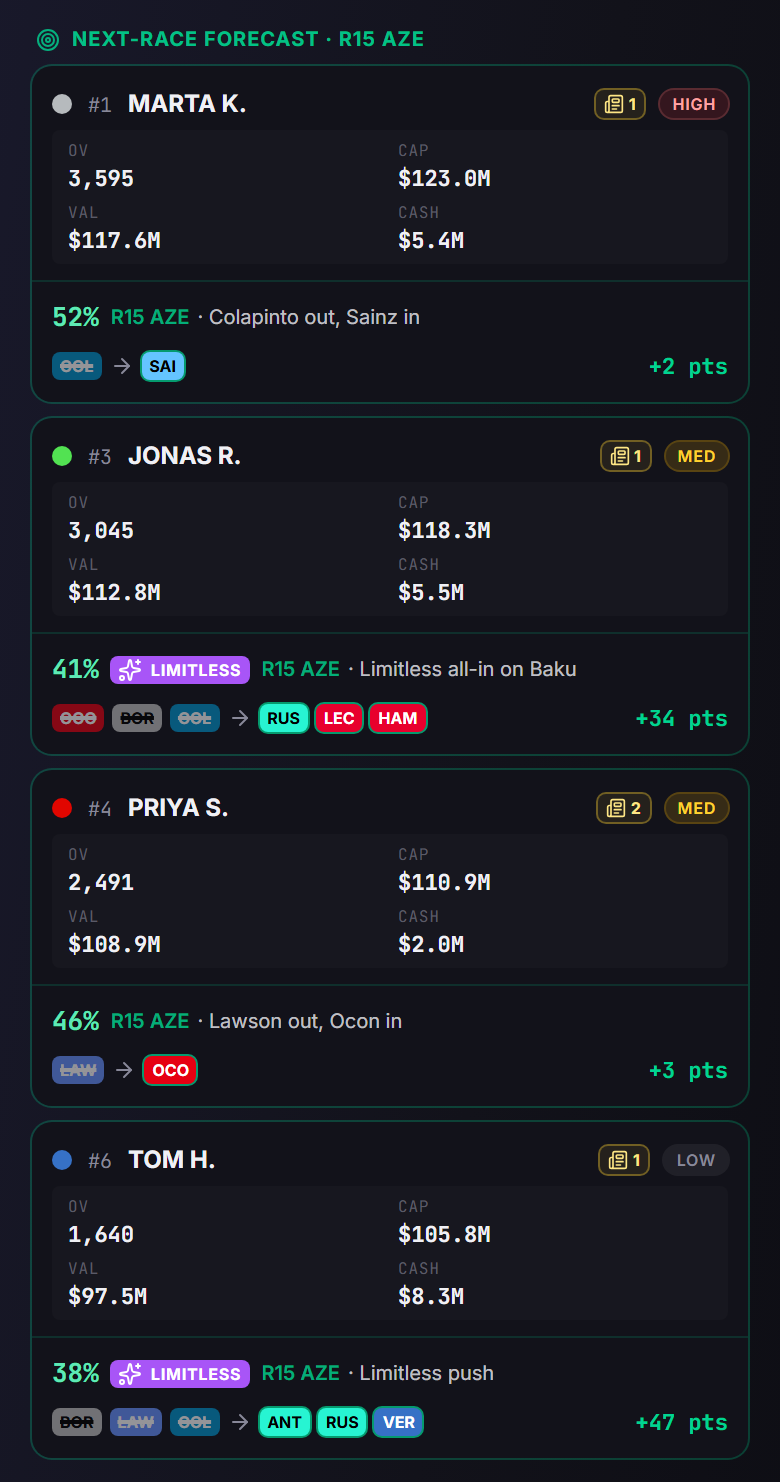
On Pro each opponent's stat card carries a forecast: Next · R{n} {ABBR}, a threat level (HIGH, MED or LOW), the top scenario, and Click for full detail. The desktop popup has five tabs — Overview / Scenarios / Chips / News / Advice. Overview shows the opponent's team under Current team, the threat level, "Top scenario: {p}% · {move} · {±pts}" and the OV/CAP/VAL/CASH row. News is an in-app tab with a count, not a notification.
Say it plainly
Forecasts are the app's model of likely moves. They are not facts about what an opponent will do. The transfer costs on the Scenarios tab come from the same model; read them as its assumption, not as the rulebook.
Before F1 locks lineups, a forecast is re-run on your next visit when the app's driver point predictions or race simulation for that race change, or when you add an opponent it doesn't cover yet. Opponents' transfers don't re-run it. Once F1 locks lineups it stops refreshing by itself until F1 opens the next round. A card that failed says Forecast failed and shows Retry, which runs the forecast again, even after the lock. Before this week's race simulation has run, every opponent card shows that state with the message "Forecasts for {track} open once this week's race simulation has run…".
7. F1 Fantasy league tips: how to read the page each week
Outside the Pro Advice tab, the page shows rather than tells. These are the reads it makes easy.
- Read © across each recent round before you set your own 2X Boost. The grid holds completed rounds only, so it shows habits, not this weekend's picks. If every opponent you compare boosts the same driver and you boost that driver too, the boost adds the same points to each of you (chips aside), so it can't move you against them; a different one can, both ways.
- Find your differentials. A driver you have that an opponent doesn't: a chip in your cell with no twin in theirs.
- Watch Val and Cash, not just pts. An opponent with cash in hand can make a move you can't. On Standard and Pro, the Cash on hand chart shows how that changed.
- Count the chip badges. On Standard and Pro, with the full season open, they tell you which opponent has already played which chip; Free's 3 latest rounds show only recent ones.
- Once F1 locks lineups, open the moves panel (Standard and Pro). Who moved, who held, who played a chip: next week's planning, done before the race starts.
8. Free, Standard, Pro — what costs money
Tier names as the plans use them; the UI prints "PRO". No prices here — they are on /pricing.
Sign in and go
Free
- The whole flow above
- 2 saved leagues
- You + 1 opponent
- The 3 latest completed rounds
- Your own stat card (desktop)
Unlocks the full tool
Standard
- 6 saved leagues
- You + 4 opponents
- Full season in the grid
- The cell drawer, the four charts
- Opponents' stat cards
- This weekend's lineup moves
Adds the forecasts
Pro
- Everything in Standard
- Competitor forecasts per opponent
- The AI Coach, which is outside this guide
| On this page | Signed out | Free account | Standard | Pro |
|---|---|---|---|---|
| Use the League Analyzer | No (sign-in card) | Yes | Yes | Yes |
| Saved leagues | — | 2 | 6 | 6 |
| Members compared (including you) | — | 2 (you + 1) | 5 (you + 4) | 5 (you + 4) |
| Race history in the grid | — | 3 latest completed rounds | Full season | Full season |
| Cell drawer (rosters, transfers, chip, value) | — | No | Yes | Yes |
| Performance charts (4) | — | No | Yes | Yes |
| Opponents' stat cards (current OV · CAP · VAL · CASH) | — | No (your own only, desktop) | Yes | Yes |
| This weekend's lineup moves (from the lock) | — | No | Yes | Yes |
| Competitor forecasts | — | No | No | Yes |
| Your own F1 Fantasy teams in a multi-team league | — | 1 | up to 3 (within the 5 compared) | up to 3 (within the 5 compared) |
Every account tier shows each compared member's Val and Cash in the grid cells, for every round it can open. The stat cards are the current OV, CAP, VAL and CASH.
Three ways up, all leading to the same page: the Free strip's Unlock more opens Standard adds and Choose a plan; the PRO strip has an Upgrade button; and every lock popover offers Upgrade.
Say it plainly
The tier numbers above come from the plan limits, not from the strips. The Free strip's "2/2 leagues · 1/1 opponents" is fixed text, not a meter of what you have used.
9. On a phone
The bottom tab says League.
The grid becomes one card per round, newest first, members stacked inside it with Val and Cash at the top of each block; rounds collapse under their headers. There is no YOU card on mobile. A Next-race forecast stack of opponent cards takes its place — lock cards on Free and Standard, forecasts on Pro. The popup's tabs are Overview / Moves / News / Advice.
10. When something looks wrong
- The loader is stuck on "1 snapshot failed — the grid will render what's available." — reload the page.
- "Your linked F1 Fantasy team isn't a member of this league" — join the league on F1 Fantasy with the team you linked, then scan again.
- Clicking your own cell on Free opens an upsell. That is expected: the drawer is Standard and up, and your own cell is no exception.
Your call
The League Analyzer won't make your move for you. It shows what the members you compare have done — their lineups, 2X Boosts, transfers and chips, race by race — and, on Pro, a model of what each opponent might do next, with a short "How you should respond" suggestion on the popup's Advice tab. Whether any of that changes your move this week is your call.
Scan your league, then build the move in the Team Builder and check the money in the Budget Builder. Both have guides in this series: how to use the Team Builder and how to use the Budget Builder.
Open the League Analyzer →